Grid address (login URI): http://mystaraliza.duckdns.org:8002/
Adding Mystaraliza Grid to Firestorm
- Make sure you have the OpenSim version of Firestorm, available from firestormviewer.org (choose the version that says OpenSim support).
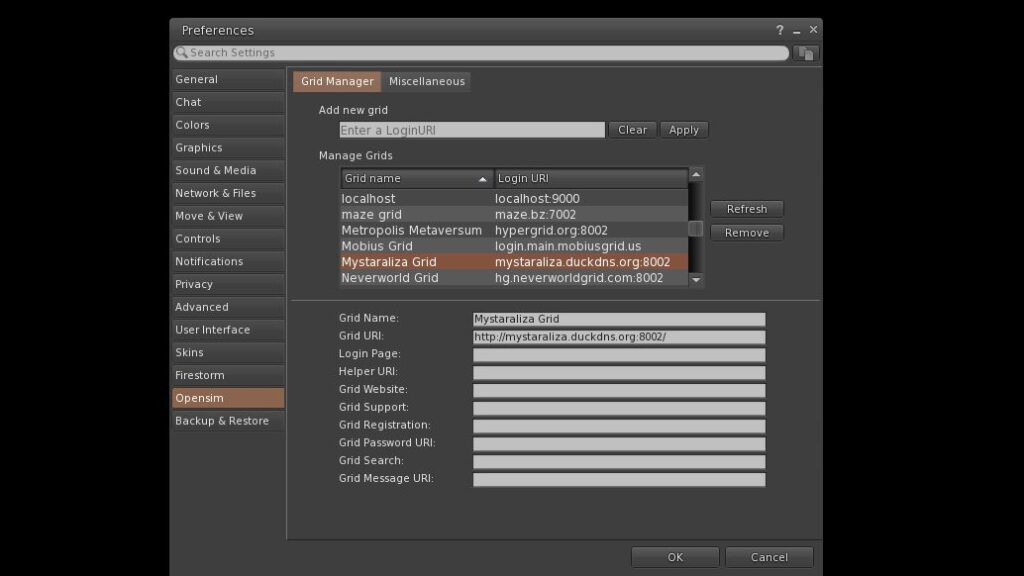
- Open Firestorm and go to Viewer → Preferences (or press Ctrl + P).
- Click the OpenSim tab, then Grid Manager.
- In the Add new grid box, paste:
http://mystaraliza.duckdns.org:8002/ - Click Apply, then OK.
- On the login screen, choose Mystaraliza Grid from the grid list, enter your avatar name and password, and log in.
Visiting from another grid (Hypergrid)
You can visit without an account. From your home grid, open the World Map, type mystaraliza.duckdns.org:8002 in the search box, and teleport. Please read our Terms of Service before visiting.
Registration
Accounts on Mystaraliza Grid are by invitation only. If you’ve received an invitation, follow the link in your invitation email to set up your avatar.